← All apps
Super PDF

macOS · PDF

Big ideas.
Inside your PDF.

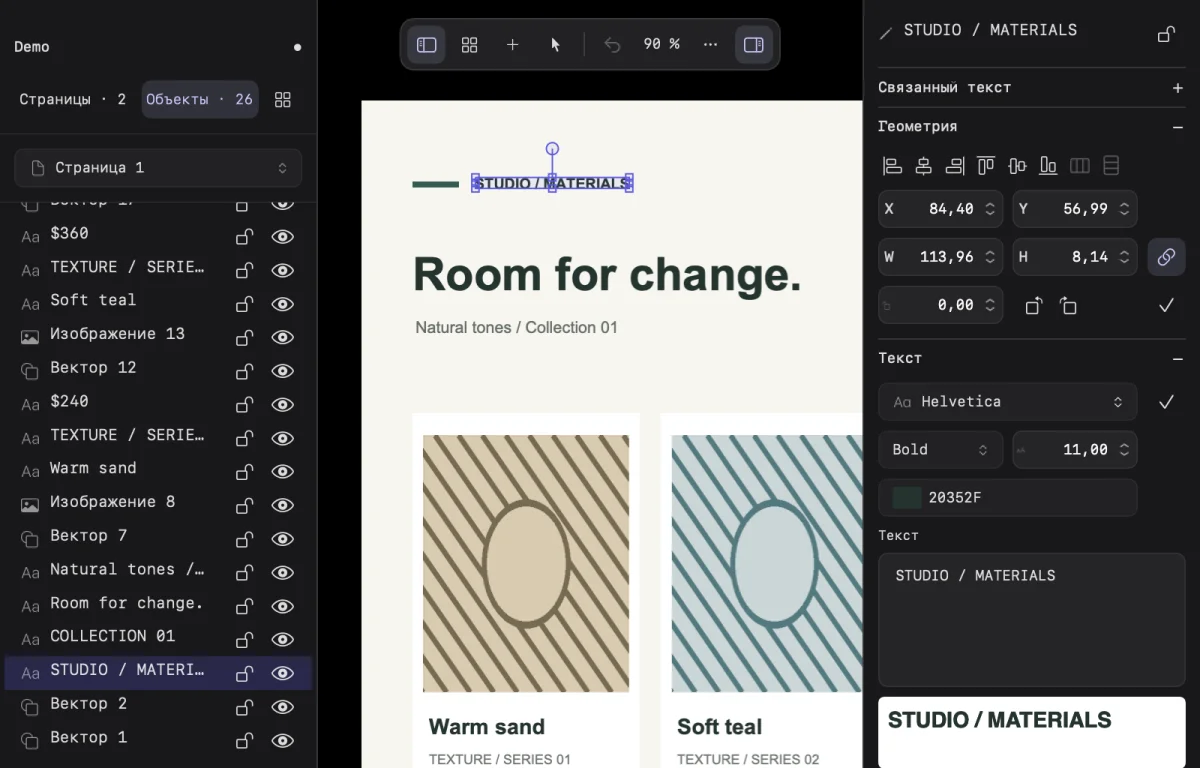
Edit text, images and vectors. Arrange pages. Create documents that look exactly as you imagined.

Try it ↓
Studio — Super PDF100%
STUDIO / 2026FORM & COLOUR
Form matters.
Studio collection01 — 03

Interactive preview

Editor

A full creative studio for your PDF.

A PDF editor for Mac with editable text, images, vector paths, page layouts and built-in design libraries.

Typography / 01Form matters.
Image
Text
Image
Vector

Correct a typo or rewrite a heading. Change typefaces, colors and alignment, and arrange text into up to eight columns.

A story that keeps flowing.

Link text blocks across columns and pages. Build a catalogue, proposal or editorial layout with a continuous story.

STUDIO / JOURNAL

Good ideas deserve a place.

A good idea starts with a blank page. Give it room for precise words, bold images and the little details that make the work yours. The column changes, the story continues and a new page begins. Headings set the direction. Text connects ideas. Open space helps you see what matters. Build a collection of ideas, one page at a time.
01
STUDIO / JOURNAL
02
1 → 2

Your pages. In a new order.

Add, duplicate, rotate, resize and reorder pages. Assemble the document around your content.

STUDIOText
01
STUDIOImage
02
STUDIOVector
03
1 → 2 → 3

A head start for every idea.

216 icons, 162 shapes and 155 patterns. Recolor and edit assets, create your own and keep them in your library.


Color with depth.

Five gradient styles, adjustable colors, fills and strokes. Try a new look and undo changes when you want to go back.

Inside the app

A full creative studio for your PDF.

Super PDF
18

One app. More possibilities.

18 file tools for everyday work: merge and split PDFs, turn images into documents, add page numbers and watermarks, and scan from iPhone.

Features

The right words. The right form.

Correct a typo or rewrite a heading. Change typefaces, colors and alignment, and arrange text into up to eight columns.

Make every image belong.

Replace and crop images, apply filters and place them precisely on the page. Adjust the composition without leaving your document.

Shape the smallest detail.

Edit vector nodes and Bézier handles, change fills and strokes, and build your own editable shapes.

Everything in its place.

Group objects, change their order, align them and lock finished elements. Move an entire composition together.

A story that keeps flowing.

Link text blocks across columns and pages. Build a catalogue, proposal or editorial layout with a continuous story.

Your pages. In a new order.

Add, duplicate, rotate, resize and reorder pages. Assemble the document around your content.

A head start for every idea.

216 icons, 162 shapes and 155 patterns. Recolor and edit assets, create your own and keep them in your library.

Color with depth.

Five gradient styles, adjustable colors, fills and strokes. Try a new look and undo changes when you want to go back.

One app. More possibilities.

18 file tools for everyday work: merge and split PDFs, turn images into documents, add page numbers and watermarks, and scan from iPhone.

Language